
One Workspace, Multiple Tasks: Planning a More Flexible Home Office
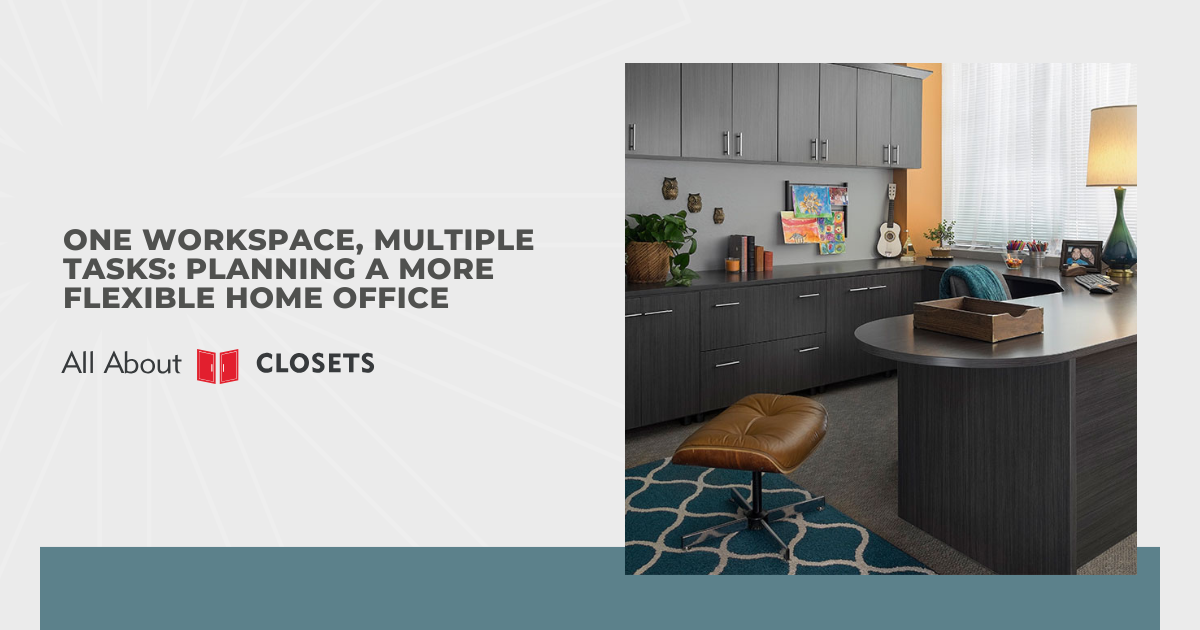
Video calls, homework, and hobby projects rarely share a home office desk without some friction. Kitchen tables can absorb a laptop for an hour, but a dedicated workspace has to hold up to all three, sometimes in the same afternoon. Three different jobs sharing one room call for different planning than a room built to handle only one. I map out a lot of home offices around exactly that overlap, and the planning starts well before anyone picks out furniture.
Successful multipurpose offices handle several jobs without letting any one of them take over the space permanently. What I watch for on a walkthrough is whether a desk can clear down to bare surface between a call and homework time, not whether it looks staged when nobody's using it. Desks that clear down fast usually give each task its own claim on the room, instead of squeezing three tasks into whatever space is left over. Furniture and storage matter, but the order you make those decisions in matters more than either one, since picking pieces before mapping out the tasks is how offices end up only half-flexible.
Planning a home office that handles more than one job comes down to a handful of decisions made in the right order:
- Define the workspace by task
- Build storage that adapts to the task at hand
- Choose furniture that resets between tasks
- Manage cables and tech for shared use
- Layer lighting for more than one task
- Reduce noise and echo for calls
- Set up a reset routine that keeps the space usable
There's a specific question I ask before touching a single piece of furniture, and it has nothing to do with square footage.
Define the Workspace by Task
One question I ask before touching a floor plan or a single piece of furniture: which tasks actually need to share this room, and how often does each one show up. Video calls, homework, hobby projects, and bill paying rarely land at the same hour, but they still fight over the same six feet of desk if nobody's mapped out how often each one actually happens. I've watched a beautifully organized desk fall apart in a week because it was built around the task someone assumed mattered most, not the one that actually showed up every day. Furniture gets picked out later, and it only earns its spot by serving whatever that real hierarchy turns out to be.
Who's using the room changes that hierarchy completely. A parent taking back-to-back calls has almost nothing in common with a desk that also has to host homework help by four o'clock. Two people sharing your desk at different hours need enough room to switch without packing away someone else's project first, so I look at what each task actually needs on the surface rather than how much space it looks like it needs: a call wants a clean visual field and decent light, homework wants room to spread out papers or a tablet, and a hobby project might only need a drawer that closes. Side by side, those three needs usually reveal a room's real limits well before storage or furniture ever comes up.
I don't treat every task on that list the same way, and neither should you. Wrapping a gift or filing paperwork twice a year doesn't deserve the same square footage as a daily video call, so I weigh how often something happens against how disruptive it would be if it got squeezed out entirely, and that weighing is where I actually start drawing the layout, not the room's total square footage. A task list built on that kind of honesty is what makes everything after it, storage, furniture, lighting, actually flexible instead of just crowded.
Build Storage That Adapts to the Task at Hand
A shared desk stays useful across every task when what's within reach changes with what's happening that hour. I set up storage in layers on most of the home offices I plan, with the tools for the loudest task front and center and everything else one step back. Bins, trays, and small drawer dividers do more work here than a single wall of open shelving ever will. Open shelving looks organized in photos. It turns into a dumping ground the moment three different tasks start competing for the same surface.
Bins mean nothing without labels, since video call gear sits behind a cabinet door most of the day and needs to come out fast without hunting through mixed bins. A school folder and a half-finished hobby project need separate spots too, since one gets picked up again tomorrow and the other stays put for good. How long something stays out matters more to me than what category it falls into. A "temporary" pile still sitting there after a week isn't temporary anymore, it's just unsorted, and that's usually the first place your system breaks down.
Storage that adapts needs a reset every so often too, not a single setup you fill once and forget. Baskets, drawer dividers, and even shelf height should move as often as the tasks sharing your room do, because a fixed setup ages out fast once even one task changes. Even a five-minute shuffle of what sits at eye level counts as a reset worth doing. A system stops earning its keep the moment it still matches last year's routine instead of this year's, which is the first thing I check when a setup stops working. Regular resets keep storage in step with every task your home office actually handles.
Choose Furniture That Resets Between Tasks
Furniture earns its place in a shared home office by how fast it lets the room change jobs, not by how good it looks holding still. Bolt your desk into one configuration and it might handle a single task fine, but it becomes the bottleneck the moment homework needs room where a laptop just sat an hour earlier. Wheels, folding surfaces, and pieces light enough for you to move alone do more for flexibility than square footage ever does. Weight is the detail I check first on anything going into a room like yours, since a piece that takes two people to shift never actually gets shifted.
Rolling carts solve more problems here than a second desk ever would, mainly because your hands stay free to carry supplies while the cart does the moving. Add a drop-leaf or fold-down surface for the opposite problem: it gives you a work surface for twenty minutes and disappears again once your call wraps up. Heavy console tables might photograph beautifully against the wall, but I'd rather point you toward a piece that actually gets moved once it's living in a room like yours. Furniture that never gets shifted stops earning its keep the moment it's parked for good. Stackable or nesting stools beat a second chair for the same reason, since they store flat and only come out when you need a second seat.
Stability still matters more than mobility in a few specific spots, and that tradeoff catches people off guard. Printers and monitor arms need a surface that won't wobble mid-call, so that piece earns a fixed spot in your setup even while everything around it moves. Locking wheels are what usually resolve this for you, since a cart rolls when your hands push it and holds still once it's parked where you need it. I don't call a room flexible until I've checked that the few pieces that have to stay still are anchored down, not just sitting there looking permanent. Furniture chosen this way ends up doing double duty for you instead of forcing you to choose between stable and flexible.
Manage Cables and Tech for Shared Use
Cables cause more daily friction in a shared home office than almost anything else on this list, mostly because different tasks plug in different gear at different hours. A monitor, a laptop charger, a printer, and a lamp all fighting for the same power strip usually means someone's unplugging something they still need. Shared outlets wired in a daisy chain cause that exact problem, and it shows up the moment a call and a print job happen back to back. A quick test tells me almost everything I need to know about a setup: unplug one device and count how many others go dark with it. Splitting power sources by task instead of by convenience is what that test usually points to.
That same task-by-task split works on the cords themselves, not just the outlets. Cutting frustration here has less to do with buying an organizer and more to do with labeling each cord at the plug end, since a tangle of identical black cables tells you nothing about which one belongs to what once they're grouped. Bundle the call setup, the printer, and the charging station separately, and each labeled group becomes something you can move or hide without untangling the whole desk. A cable box or clip-mounted tray keeps those bundles from tangling back together the moment something gets pulled out for the next task.
Bundles solve tangling, but they don't solve the charging problem underneath them, since needs change depending on which device is in use that hour. A fixed charging spot rarely covers every task your room handles once devices start rotating through it. A USB hub with several ports beats single-device chargers scattered across the desk, since it lets you swap what's plugged in without hunting for an outlet. Power strips with individual switches let you kill power to gear that's not in use without unplugging anything by hand. I'd rather size a strip for what gets added next year than for what's sitting on the desk today, since tech in these rooms tends to expand rather than shrink.
Layer Lighting for More Than One Task
Where the light lands tells me more than how bright a fixture is, and that's the first thing I check in a shared home office. One overhead fixture rarely does its job well for more than one task at a time, since a video call and detailed hobby work need almost opposite kinds of light. Ceiling fixtures throw shadows across your face from above, which looks fine for reading but flattens badly on a webcam. Task lighting solves the opposite problem, focusing light down onto a surface without doing anything for your face or the room around it.
Overhead and task light miss different things, which is exactly why layering earns its place in a room like this. A front-facing light source, whether a lamp or a ring light, fills in what the ceiling fixture misses during calls, and you can angle it without touching the room's main lighting at all. Dimmable bulbs are worth the extra cost on almost every job I plan, since a room used for calls in the morning and reading at night needs two different brightness levels from the same fixture. Adjustable task lamps handle the closer work, letting you aim bright light exactly where a hobby project or paperwork needs it without lighting up the whole desk.
Color temperature matters here too, more than most people expect going in. Mismatched bulbs across a room are a small problem I see constantly, and matching them is one of the cheapest fixes on this whole list. Cooler, bluer light keeps you alert during calls and focused work, while warmer light suits evening tasks that don't need the same sharpness. Consistency like that, layered with a mix of overhead, task, and front-facing light, is what lets your home office actually shift between jobs without a single lighting setup working for none of them.
Reduce Noise and Echo for Calls
Sound behaves differently once a room starts serving more than one job, and that's often the last thing anyone plans for. Hard floors, bare walls, and open shelving all help make a space flexible, but those same surfaces bounce sound around and turn a quiet call into an echoey mess. A rug under the desk fixes more of this than people expect, since it absorbs the reflection that bounces straight back into a laptop mic. Curtains or a fabric wall panel do the same job on a vertical surface, catching sound before it ricochets across the room. Neither one has to look purely functional, so a rug or curtain chosen for sound can still match the rest of the room.
Distance from the rest of the house matters just as much as what's inside the room itself. A door that closes fully blocks more noise than most people expect, especially compared to an open doorway or a half-wall separating the office from a living area. A desk positioned away from a hallway or a shared wall solves half the problem before a single sound panel goes up, since distance does work no material can replace. A white noise machine or a small fan covers what distance can't, masking background noise from the rest of the house without drawing attention to itself the way a loud fix would. Bookshelves packed with actual books work as a surprisingly effective sound barrier too, and that's a second job your storage never has to advertise.
Calls expose acoustic problems that other tasks in the room never would, since homework and hobby projects don't care if a room echoes. I test a room's sound by clapping once from the desk chair and listening for how long it takes to die out, and a long, ringing tail usually points straight to hard, flat surfaces nearby. A soft rug or a single fabric panel on the worst wall usually fixes a call that sounded hollow before, without treating the whole room. None of this needs a dedicated soundproofed room, just a few soft surfaces breaking up the hardest ones nearby.
Set Up a Reset Routine That Keeps the Space Usable
Every system covered so far only holds up if something resets the room between tasks, and most plans never account for that piece. A desk cleared for a call still needs to shift into homework mode an hour later, and that shift either happens on purpose or it doesn't happen at all. Who clears the desk, and when, matters more to me than how good the system looks on paper, since a plan with no owner and no timing rarely survives past the first busy week. A two-minute reset between tasks beats a weekend deep clean that only happens after the room's already a mess.
A reset tied to something that already happens daily works better than one scheduled separately. Right before dinner, right after school pickup, or right when a call ends works well as the anchor, tying the habit to something your household already does instead of asking for one more thing to remember. Two minutes is usually the real number here. Most people assume a reset takes twenty, but putting things back where storage already expects them takes far less time than finding a new spot for something out of place. Even one skipped reset tends to snowball, since one cluttered task makes the next one harder to start clean.
A reset routine also needs to bend as your household's tasks change over a year instead of staying fixed the way it was set up on day one. A routine built around last spring's homework schedule is the kind of thing I watch for going stale, since it rarely fits what the room handles by fall without someone catching the mismatch. Storage, furniture, lighting, and acoustics all did their part so far, but none of it stays flexible without a routine that keeps resetting the room to match what's happening in your room day to day. A home office set up this way keeps working long after the furniture stops being new.
Conclusion
A home office that handles more than one job comes down to the order you make those decisions in, not any single upgrade on its own. Task, storage, furniture, cables, light, sound, and a daily reset each solve a different piece of the same problem, and skipping the earlier ones tends to undo whatever you fix later. I've watched plenty of good furniture get wasted in a room where nobody figured out which task actually mattered most first. A room built this way keeps up with whatever you ask of it next, whether that's a call this afternoon or a hobby project next spring, and it keeps holding up long after the furniture stops feeling new. Getting the order right the first time saves you from redoing all of it later.

George obtained a Master of Science Engineering Degree from New Jersey Institute of Technology. After graduation, he worked at AT&T Bell Labs and Lucent Technologies after the company split. With an extensive background in construction management and ergonomic space design, spanning residential and commercial, designing and installing closets in New Jersey is second nature for him.